
End-to-End Distributed PDF Processing Pipeline
Build production-ready PDF processing pipelines with distributed computing, OCR, spatial analysis, and GPU embeddings
by Malcolm GreavesPDF processing pipelines break on edge cases. Data engineers spend hours debugging memory limitations, custom OCR scripts, and fragmented toolchains. Even processing a few PDFs can be challenging. There's a whole host of new problems that arise when scaling up a PDF processing pipeline. These challenges become critical across industries that process documents at scale:
-
Financial Services: Mortgage processors analyze thousands of loan applications daily—financial statements, employment verification, property assessments. Traditional OCR fails on rotated pages, mixed layouts, handwritten annotations.
-
Legal Technology: Law firms process contract repositories with millions of agreements. Teams extract specific clauses, key terms, and language patterns while maintaining spatial context for legal interpretation.
-
Healthcare: Medical organizations process patient records, insurance claims, clinical reports containing structured forms, handwritten notes, and medical imagery requiring flexible extraction approaches.
Traditional document processing tools fragment these workflows across multiple systems, creating operational complexity and scaling bottlenecks.
Enter Daft, a distributed query engine providing simple and reliable data processing for any modality at any scale. Daft lets you process documents as naturally as you process tabular data—no infrastructure complexity, just declarative pipelines that scale automatically.
This blogpost goes over our PDF handling tutorial. We build out a production-quality PDF pipeline that handles downloading PDFs from an S3 bucket, parsing and processing them into an easy-to-use form, and computes embeddings using the GPU.
Watch the Complete Walkthrough
Software engineer Malcolm demonstrates building a feature-rich PDF processing pipeline from scratch. Watch him download PDFs from S3, extract text with OCR, perform spatial layout analysis, compute GPU embeddings, and save everything to Parquet—all in 20 minutes.
The Problem: Traditional Engines Can't Handle Documents
Traditional engines excel at structured data—rows, columns, simple types. Documents require different architecture:
| Data Type | Traditional Approach | Daft's Multimodal-First Design |
|---|---|---|
| GPU Workloads | Manual resource allocation, custom batching, separate orchestration | num_gpus=1 parameter, automatic lifecycle management |
| Nested Document Structure | Flatten to rows/columns, lose spatial relationships | Preserve hierarchical structure |
| Embeddings Pipeline | Separate systems (extraction → processing → embedding → storage) | End-to-end in single declarative pipeline |
| Schema Management | Manually maintaining Python code and corresponding Arrow schemas | Automatic Pydantic → Arrow conversion |
| Scaling | Rewrite for distributed execution, manage partitioning | Same code from laptop to cluster |
Traditional PDF processing requires this complexity:
# Traditional approach - manual everything
pdf_schema = StructType([
    StructField("pages", ArrayType(StructType([
        StructField("text_blocks", ArrayType(StructType([...])))
    ])))
])  # 15+ lines just for schema


def process_pdf_traditional(pdf_bytes):
    # how do you use the pdf_schema arrow type?
    pass


my_pdfs: list[Path] = ...
# This is sequential -- how do you balance running these in parallel?
for pdf in my_pdfs:
    with open(pdf, 'rb') as rb:
        processed = process_pdf_traditional(rb.read())
        # where do you collect these? in memory? write out to disk?
Daft's approach:
from daft import DataFrame, udf, Series
from pydantic import BaseModel

class ParsedPdf(BaseModel):
   ...

# Multimodal-native - clean and declarative
@udf(return_dtype=daft_pyarrow_datatype(ParsedPdf))
class LoadAndParsePdf:
    def __call__(self, urls: Series, pdf_bytes: Series) -> Series:
        # Natural handling of complex document type into Arrow schema
        # Daft manages concurrency and spooling out results to your final write destination


df: DataFrame = ...
df = df.with_column("parsed", LoadAndParsePdf(df['pdf_bytes']))
Architecture Overview: End-to-End Multimodal Processing
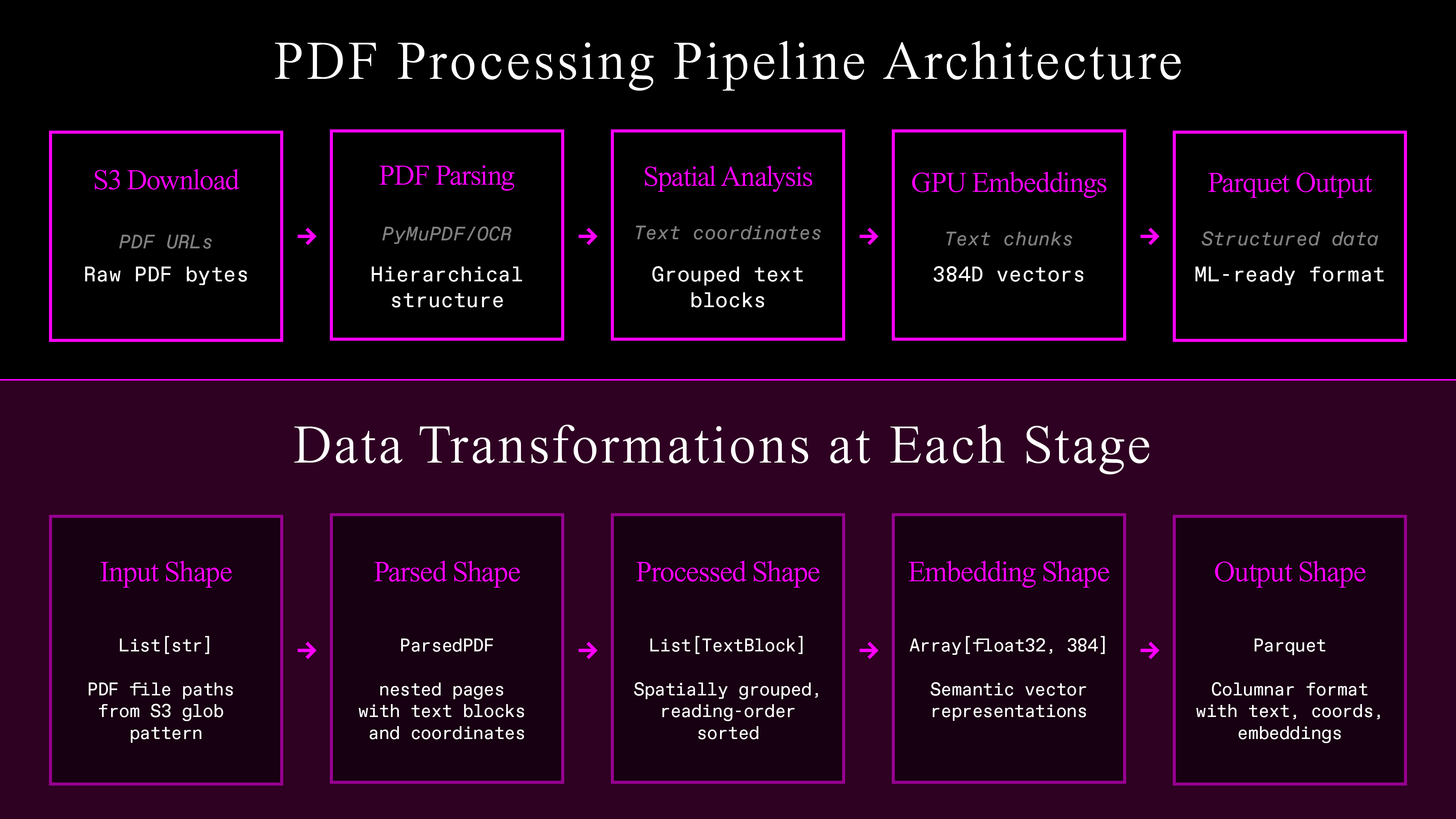
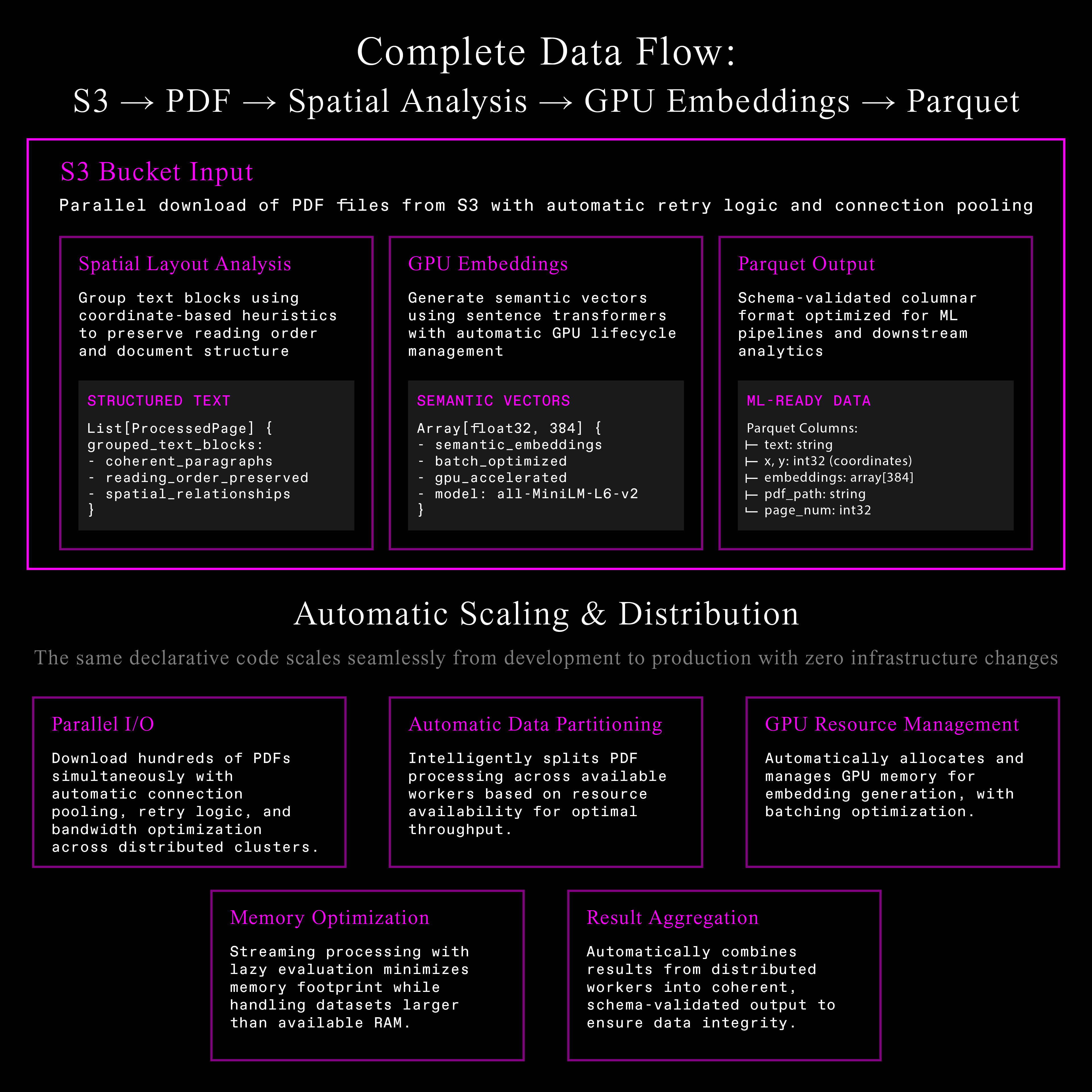
The Complete Pipeline
The architecture is the following six connected stages. Each one feeds directly into the other:
-
Parallel S3 download — Handles thousands of documents simultaneously, with retry logic to obtain optimum throughput. Produces raw PDF bytes.
-
Flexible PDF text extraction — Either OCR or PDF processing to extract text with bounding boxes.
-
Spatial layout analysis — Coordinate-based grouping to recover line and paragraph structure.
-
GPU embeddings — Uses readily available models to produce 384-dimensional vectors for each piece of grouped text.
-
Structured Parquet output — Schema-validated data that's ready to go for ML pipelines.
Follow Along in Google Colab
Code alongside this tutorial with our interactive notebook. All dependencies are pre-installed, and you can run the complete pipeline with real data in minutes. Open the notebook
Document Structure with Pydantic
Document processing requires structure. Unlike traditional NLP where text is one-dimensional, documents are spatial. Modern systems must understand both what the text says and where it appears.
# This is just pseudocode that's based on the real code in the notebook!
# See the notebook for the full implementation.

class TextBlock(BaseModel):
    text: str
    bounding_box: BoundingBox

class ParsedPage(BaseModel):
    page_index: int
    text_blocks: list[TextBlock]

class ParsedPdf(BaseModel):
    pdf_path: str
    total_pages: int
    pages: list[ParsedPage]
Pydantic models enforce structure while maintaining flexibility. Daft converts them automatically to Arrow types for efficient processing. This hierarchical structure captures the essential spatial relationships within documents.
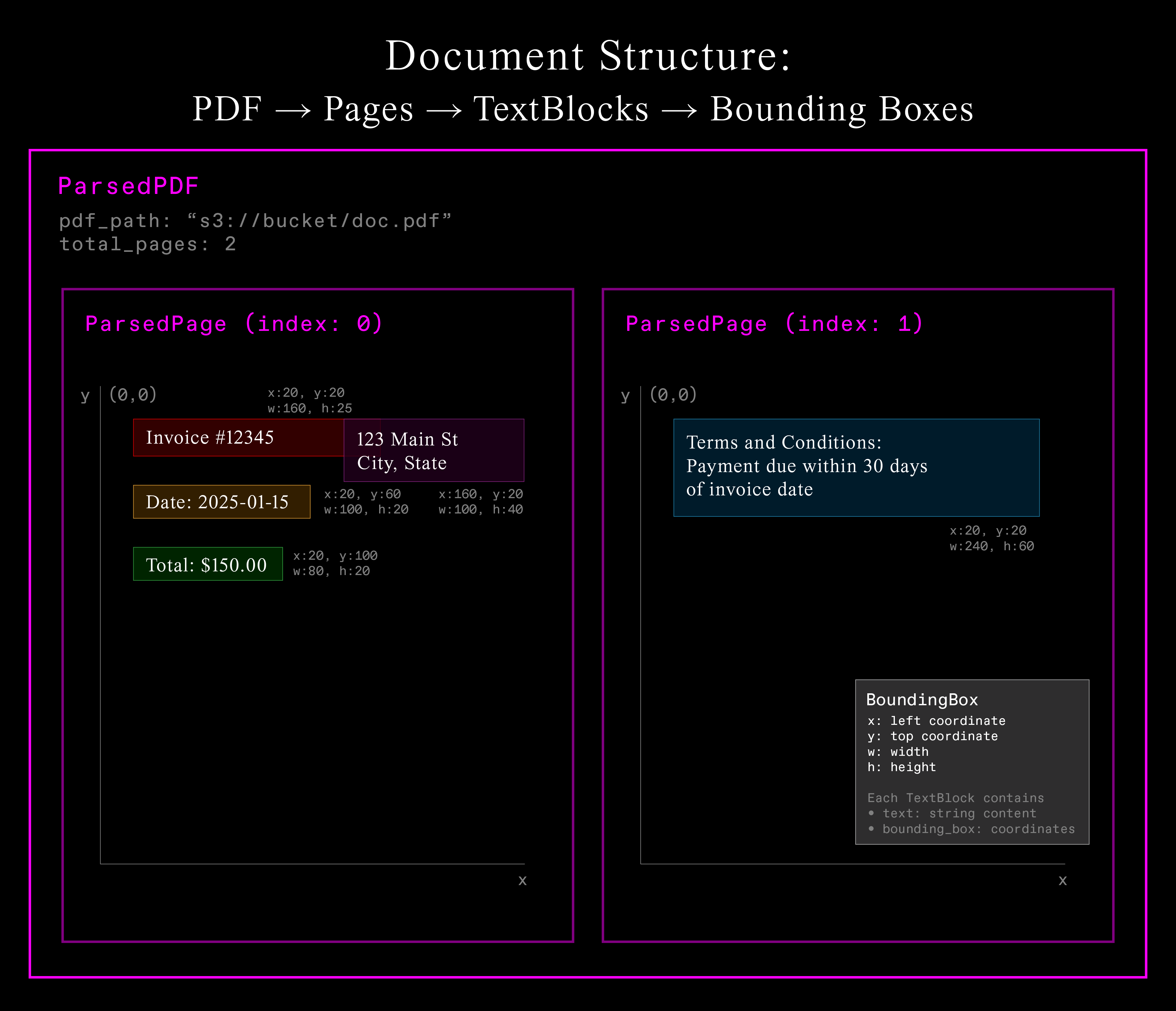
Each PDF contains multiple pages, each page contains multiple text blocks, and each text block has both content and precise spatial coordinates. This spatial information enables understanding document layout and grouping related text together.
PDF Processing with User-Defined Functions (UDF)
Now that we've defined our data structure, we can use Daft to process these complex documents at scale. Daft's UDF system defines custom logic once and scales automatically across distributed infrastructure:
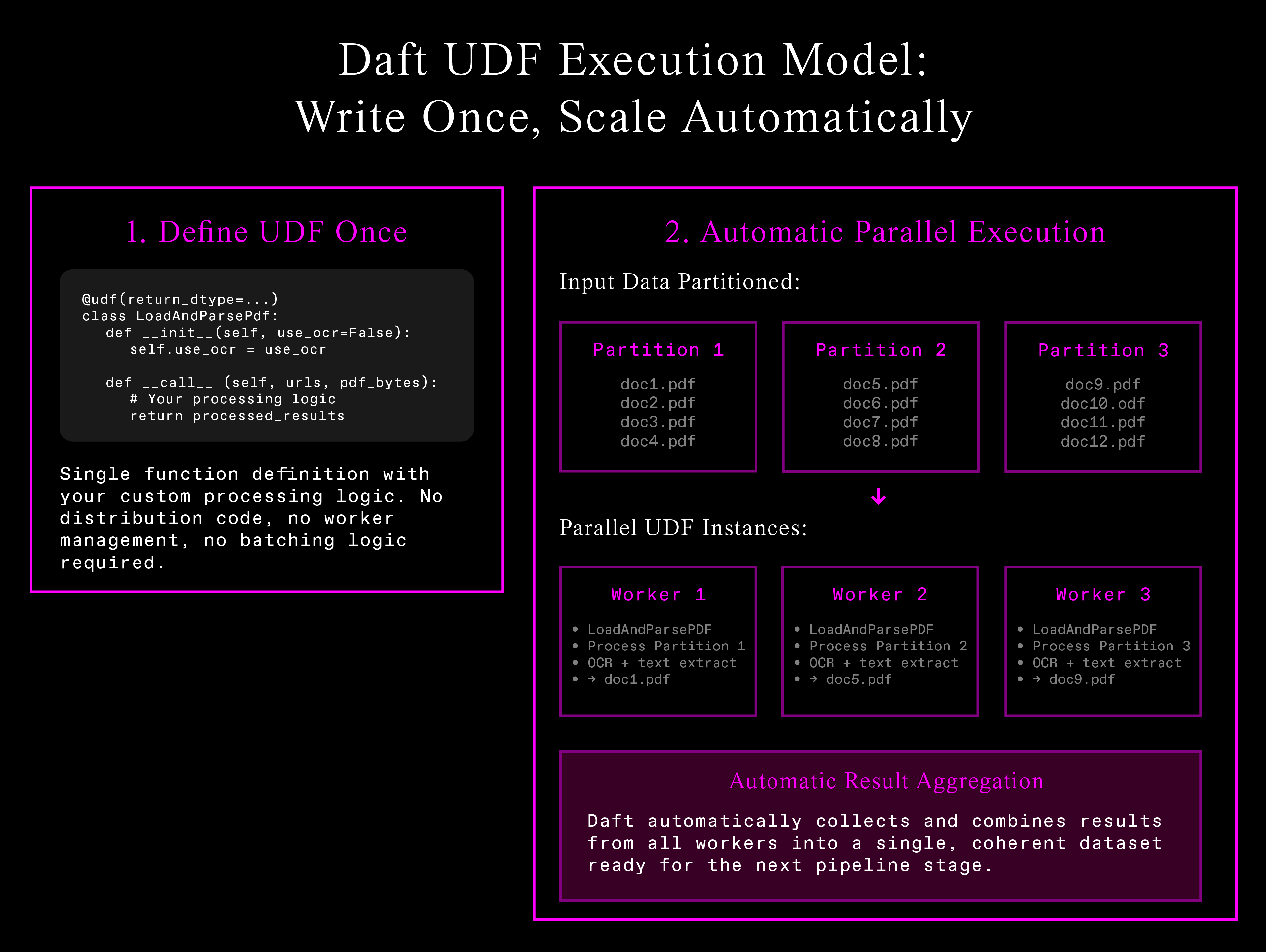
Automatic parallelization eliminates infrastructure complexity—write processing logic once, Daft handles data partitioning, worker management, and result aggregation.
# This is just pseudocode, see notebook for full implementation!

import daft

from daft import col, udf

@udf(return_dtype=daft_pyarrow_datatype(ParsedPdf))
class LoadAndParsePdf:
    def __call__(self, urls: Series, pdf_bytes: Series) -> Series:
        results = []
        for url, pdf_data in zip(urls, pdf_bytes):
            if self.ocr:
                parsed_doc = ocr_text_blocks(pdf_data)
            else:
                parsed_doc = extract_text_blocks(pdf_data)
            results.append(parsed_doc.model_dump())
        return Series.from_pylist(results)
Raw extraction is only the first step. The resulting text fragments need intelligent organization to become useful.
Spatial Layout Analysis: From Fragments to Coherent Text
Raw OCR produces fragmented text blocks. Even reading text blocks from the PDF will often produce a jumbled mess: words split into two distinct text elements with their own bounding boxes, etc. Production systems require coherent, readable text maintaining document structure.
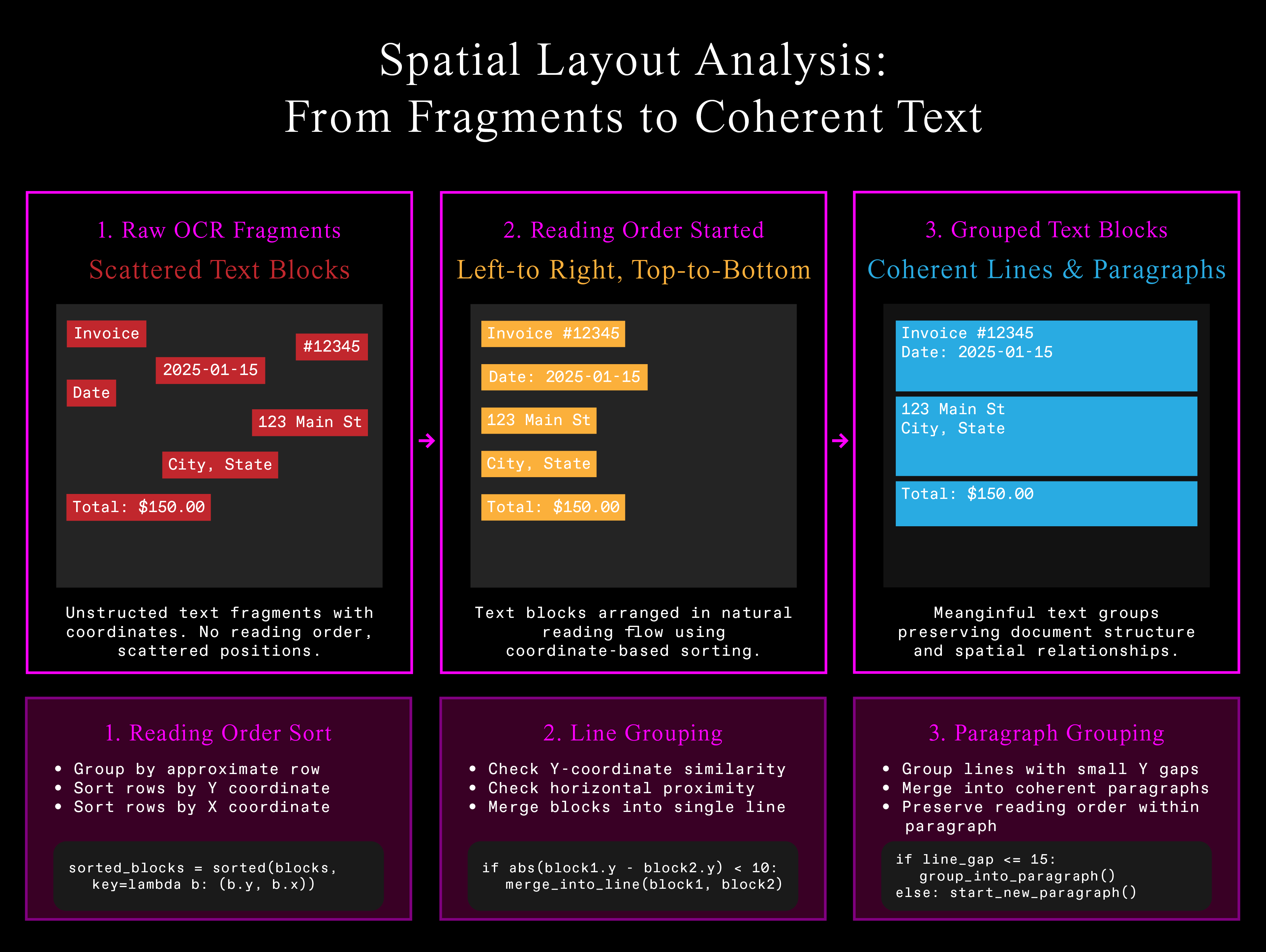
Here's a snippet of the algorithm from the tutorial notebook that makes the raw extracted text values a bit more coherent. It uses coordinate-based heuristics to infer the document's structure:
# This is just pseudocode, see notebook for full implementation!

@udf(return_dtype=daft_pyarrow_datatype(list[ProcessedPage]))
class DocProcessor:
    def __call__(self, parsed_docs: Series) -> Series:
        results = []
        for doc in parsed_docs:
            for page in doc['pages']:
                # Sort into reading order (left-to-right, top-to-bottom)
                sorted_blocks = self.sort_reading_order(page['text_blocks'])  # See notebook for coordinate-based grouping logic

                # Group into lines, then paragraphs
                if self.group_paragraphs:
                    grouped_blocks = self.group_into_paragraphs(sorted_blocks)  # See notebook for Y-coordinate clustering
                else:
                    grouped_blocks = self.group_into_lines(sorted_blocks)  # See notebook for horizontal grouping

                results.append(grouped_blocks)
        return Series.from_pylist(results)
The configurable thresholds (row_tolerance, y_thresh, x_thresh) handle different document layouts while the algorithm respects spatial relationships that give text meaning.
GPU Embeddings at Scale
With our document now properly structured and reading-order preserved, the final step is to transform this processed content and generate semantic embeddings with automatic GPU allocation and lifecycle management:
# This is just pseudocode, see notebook for full implementation!
@udf(
    return_dtype=daft.DataType.embedding(daft.DataType.float32(), 384),
    num_gpus=1  # Daft handles GPU lifecycle
)
class TextEmbedder:
    def __init__(self):
        self.model = SentenceTransformer("all-MiniLM-L6-v2").to("cuda").eval()

    def __call__(self, texts: Series) -> Series:
        with torch.no_grad():
            embeddings = self.model.encode(texts.to_pylist(), convert_to_numpy=True)
        return Series.from_numpy(embeddings)
The UDF system manages model initialization, GPU memory allocation, and batching optimization automatically.
The Complete Pipeline
Wire everything together in a single, declarative workflow:
# This is just pseudocode, see notebook for full implementation!

import daft

from daft import col

# Configuration
IO_CONFIG = daft.io.IOConfig(s3=daft.io.S3Config(anonymous=True))

# Build the complete pipeline
pipeline = (
    # Download the PDFs from S3
    daft.from_glob_path("s3://your-bucket/pdfs/*", io_config=IO_CONFIG)
    .with_column("pdf_bytes", col("path").url.download(io_config=IO_CONFIG))
    # Run either OCR or parse each PDF file to get out text and form into a structured object
    .with_column("parsed", LoadAndParsePdf.with_init_args(use_ocr=False)(col("path"), col("pdf_bytes")))
    # Reformat the text boxes structured objects (the `ParsedPdf` pydantic class instances) into rows.
    # Each row has the reading order index, the text, the page index, and the bounding box coordinates.
    .with_column("processed", DocProcessor.with_init_args(group_paragraphs=True)(col("parsed")))
    .explode("processed")  # Flatten nested structure
    .with_column("indexed_texts", col("processed").struct.get("indexed_texts"))
    .explode("indexed_texts")
    .with_column("text_blocks", col("indexed_texts").struct.get("text"))
    .with_column("reading_order_index", col("indexed_texts").struct.get("index"))
    .with_column("text", col("text_blocks").struct.get("text"))
    .with_column("bounding_box", col("text_blocks").struct.get("bounding_box"))
    # Produce embeddings for each piece of text.
    .with_column("embeddings", TextEmbedder.with_init_args()(col("text")))
)

# Execute and save
pipeline.write_parquet("./processed_documents")
What Makes This Different
Traditional engines excel at massive structured datasets, SQL workloads, proven reliability. Multimodal data requires a different architecture:
-
Automatic resource management: GPU allocation, memory management, batching optimization happen transparently.
-
Spatial operations: Built-in support for coordinate-based operations and complex nested structures preserving document meaning.
-
Declarative scaling: Same code processes 10 PDFs on laptops or 10,000 PDFs on clusters with zero infrastructure changes.
When data extends beyond traditional tables, Daft eliminates the architectural complexity gap between what teams need and what legacy engines provide.
Results
Production PDF processing pipeline handles:
-
Parallel I/O: Hundreds of PDFs simultaneously with connection pooling and retry logic
-
Flexible extraction: OCR or direct parsing with intelligent fallback mechanisms
-
Spatial awareness: Coordinate-based heuristics preserving document structure
-
GPU embeddings: Automatic model lifecycle management and memory optimization
-
Structured output: Schema-validated Parquet files ready for ML pipelines
Framework scales automatically from development to production clusters. Processing logic stays clean while Daft handles distribution, memory management, fault tolerance.
Troubleshooting Common Issues
OCR fails on scanned documents: Install Tesseract
# Ubuntu / Debian systems
sudo apt install tesseract-ocr

# OS X
brew install tesseract
GPU out of memory: Reduce batch size or use a smaller embedding model.
Different document formats: Same pipeline works for images, scanned PDFs, native PDFs. If extracting text directly from the PDF isn't working, set use_ocr=True. You should also do this for scanned documents.
Next Steps
Ready to build your own document processing pipeline?
- Try the interactive tutorial - Run the complete pipeline in Google Colab with real data
- Watch the video walkthrough - See our engineer build this pipeline step-by-step
- Read the docs - Explore multimodal processing and scale to production deployments
- Get started now -
pip install daft
FAQ
Q: How does this compare to existing PDF processing tools?
A: Traditional tools require separate systems for extraction, processing, and embeddings. Daft handles the entire pipeline in a single framework with automatic scaling and resource management.
Q: Can I use custom embedding models?
A: Yes, any HuggingFace or sentence-transformers model works. Just change the model_name parameter. Make sure you also provide the correct embedding size if you change the model! (If using SentenceTransformer, call .get_sentence_embedding_dimension() on it!)
Q: What about cost optimization?
A: Daft's lazy evaluation and automatic batching minimize compute costs. GPU resources are allocated only when needed, and the system optimizes memory usage automatically.


