
Multimodal Structured Outputs: Evaluating VLM Image Understanding at Scale
Leveraging ablation for contrastive image understanding evaluation in Daft
by Everett KlevenTLDR
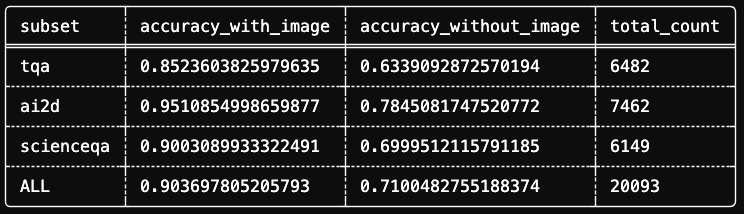
We ran a large-scale VLM image understanding evaluation on Daft Cloud and discovered statistically significant bias in multiple-choice questions within AI2D, Science-QA, and TQA datasets. Across 20,093 questions spanning 3 datasets, Qwen-3-VL-4b scored 90.36% accuracy with images versus 71.00% without. By classifying results into four scenarios, we quantified image ablation impacts and isolated test cases requiring images for correct answers.
Note: For evaluation results, scroll to the bottom of the post.
How do you know if your vision-language model is actually seeing the image or just guessing from the text?
This isn't philosophical. When using vision language models for real problems, it matters whether your model's image understanding adds value or introduces noise. Image inputs cost more—time-to-first-token metrics can take 3x longer than raw text. If your LLM pipeline operates without images, it's usually best to avoid them. Conversely, Vision-Language-Models (VLMs) have improved drastically, empowering teams to leverage generalized intelligence on images and videos.
Image understanding is a machine learning task enabling computational systems to derive semantically meaningful interpretations from visual data. A system performing image understanding extracts low-level visual features and constructs coherent representations approximating human-level interpretation, supporting downstream tasks like decision-making, description generation, or multimodal interaction. Since these capabilities are computationally expensive, we care about performance across varied scenarios.
This is where evaluations enter. A good image understanding evaluation tells you not only how you perform compared to peers, but also how effectively individual models perform across contexts and formats.
In this post, we'll build an evaluation pipeline in Daft measuring textual bias in image understanding using academic diagrams. We'll explore how well a model answers multiple choice questions by testing accuracy differences with versus without reference images. The goal is developing intuition about accuracy changes when removing images to simultaneously evaluate VLM performance and surface dataset bias. Finally, we'll investigate why particular image + question pairs failed by leveraging LLM-as-a-Judge for review. By post's end, you'll have applicable methodology for your own models.
What we'll cover:
- A few core primitives: Structured Outputs and LLM-as-a-Judge
- An ablation study isolating image understanding from text reasoning
- A quadrant framework for classifying model behavior
- Code that runs in 5 minutes on 50 rows—and scales to thousands
What is Structured Outputs?
Structured Outputs refers to features constraining language model responses to specific formats. While LLMs demonstrate impressive capabilities, unpredictable outputs make traditional software system integration difficult. Most production AI use cases leverage structured outputs for tool calls, function arguments, or schema-compliant JSON.
The key enabling technology is guided decoding (constrained decoding). Rather than hoping the model outputs valid JSON, guided decoding manipulates token probabilities during generation to guarantee valid output. The model literally cannot produce invalid tokens.
This works through several mechanisms:
- Logit biasing: Penalizing or promoting specific tokens
- Finite State Machines (FSM): Filtering tokens based on grammar rules
- Schema enforcement: Only allowing tokens maintaining JSON-schema compliance
On the development side, structured outputs consist of five constraint techniques:
- Basic Python types:
int,float,bool - Multiple choice: Using
LiteralorEnum - JSON schemas: Using Pydantic models
- Regex patterns
- Context-free grammars
For our evaluation, we'll use Pydantic models ensuring the VLM returns valid multiple-choice answers.
What is LLM-as-a-Judge?
LLM-as-a-Judge is a framework where language models evaluate other AI system outputs. Rather than relying on human evaluation (expensive, slow, inconsistent) or surface metrics like BLEU/ROUGE, LLM judges assess semantic quality at scale.
The approach was formalized in the MT-Bench paper, demonstrating strong LLMs achieve ~80% agreement with human preferences—comparable to inter-annotator human agreement.
Three common evaluation methods:
- Pairwise Comparison: The judge picks the better of two responses
- Single Answer Grading: The judge assigns scores based on criteria
- Reference-Guided Grading: The judge compares responses against known correct answers
In this pipeline, we'll use reference-guided grading with diagnostic feedback. Our judge won't just pass/fail—it will analyze why models failed, attributing errors to question ambiguity or image understanding issues.
Ablating Images in Image Understanding
We'll evaluate Qwen3-VL-8B, a capable open vision-language model, on 3 subsets of The Cauldron, a massive collection of 50 vision-language datasets from HuggingFace.
For this demo, we'll use the AI2D subset: science diagrams with multiple-choice questions. Think food webs, cell diagrams, and physics illustrations paired with questions like:
"From the above food web diagram, what would cause the kingfisher population to increase?"
A. decrease in fish
B. decrease in water boatman
C. increase in fish
D. increase in algae
These questions require genuine image understanding. Ideally, you wouldn't answer them from text alone (our ablation study revealed otherwise).
Ablation Methodology
A simple accuracy score tells us how often the model is correct, but not why. To isolate image understanding from text reasoning, we'll run an ablation study:
- Run inference with the image attached
- Run the same prompts without the image
- Compare the results
This produces four possible outcomes for each example:
| Outcome | Pass With Image | Pass Without Image | What It Tells Us |
|---|---|---|---|
| Both Correct | ✓ | ✓ | Question might be solvable from text alone |
| Image Helped | ✓ | ✗ | True image understanding at work |
| Image Hurt | ✗ | ✓ | The image confused the model |
| Both Incorrect | ✗ | ✗ | Hard question or model limitation |
The "Image Hurt" quadrant is particularly interesting. These are cases where the model got the answer right without the image but wrong with it. Understanding why this happens is crucial for improving VLM performance.
Running the Evaluation on 50 Rows
For low-commitment pipeline exploration, we'll use HuggingFace Inference Providers to run evaluation on 50 rows. First, we'll define configuration.
# pip install "daft[openai]"
import daft

# Configuration
MODEL_ID = "qwen/qwen3-vl-8b-instruct"
LIMIT = 50

# Configuring the OpenAI Provider to point to HuggingFace Inference for hosted Qwen3-VL
daft.set_provider(
    "openai",
    api_key=os.getenv("HF_TOKEN"),
    base_url="https://router.huggingface.co/v1"
)
Here we define our MODEL_ID variable for script reuse and set the provider to "openai", overriding base_url and setting api_key to our HF_TOKEN environment variable.
Loading and Preprocessing The Cauldron
HuggingFaceM4/the_cauldron is a massive collection of 50 vision-language datasets spanning millions of rows across:
- General visual question answering
- OCR document understanding & text transcription
- Chart/figure understanding
- Table understanding
- Reasoning, logic, maths
- Textbook/academic questions
- Differences between 2 images
- Screenshot to code
This superset is excellent for evaluating vision language model image understanding capabilities, providing wide-ranging tasks and image compositions. Its size alone makes it valuable for training and validation.
We're focused on the textbook/academic questions category, experimenting with AI2D, the smallest subset. We'll begin preprocessing leveraging Daft's built-in dataframe operations to decode images, explode the multiple choice question texts column, and parse assistant messages extracting answer letters with regular expressions. This provides deterministic accuracy calculation when comparing VLM structured output.
import os
from daft import col
from pydantic import BaseModel, Field

# Load the AI2D subset
df_raw = daft.read_huggingface("HuggingFaceM4/the_cauldron/ai2d")

# Decode images and extract Q&A fields
df_prep = (
    df_raw
    .explode(col("images"))
    .with_column("image", col("images")["bytes"].decode_image())
    .explode(col("texts"))
    .select(unnest(col("texts")), "image")
    .with_column("answer", col("assistant").regexp_replace("Answer: ", "").lstrip().rstrip())
).collect()
Daft handles image decoding natively, without PIL boilerplate. Each row now contains a decoded image and corresponding question/answer pair.
Structured Output Inference
Here's where structured outputs shine. Since we're testing the model's multiple choice answering ability, we define a Pydantic model for response format with description reminding the model to respond with only the choice letter.
class ChoiceResponse(BaseModel):
    """Structured output for multiple choice answers."""
    choice: str = Field(..., description="The letter of the correct choice (A, B, C, D)")
Then run inference using Daft's prompt function:
from daft.functions import prompt

df_results = df_prep.with_column(
    "result",
    prompt(
        messages=[col("image"), col("user")],  # Image + question
        model=MODEL_ID,
        use_chat_completions=True,
        return_format=ChoiceResponse,  # Enforces structured output
    )
).limit(LIMIT).collect()
The return_format=ChoiceResponse parameter ensures every response is valid JSON matching our schema.
Running the Ablation
Now we run the same prompt without images:
df_ablation = df_results.with_column(
    "result_no_image",
    prompt(
        messages=col("user"),  # Text only—no image
        model=MODEL_ID,
        use_chat_completions=True,
        return_format=ChoiceResponse,
    )
).limit(LIMIT).collect()
Evaluating Correctness
Since we're dealing with structured outputs, we can rely on outputs being letters A-D, which may be padded with extra spaces. Simple string left/right strip expression removes padding, leaving final string equivalence checks trivial.
# Evaluate correctness for both conditions
df_eval = df_ablation.with_column(
    "is_correct",
    col("result")["choice"].lstrip().rstrip() == col("answer")
).with_column(
    "is_correct_no_image",
    col("result_no_image")["choice"].lstrip().rstrip() == col("answer")
)
Classifying into Quadrants
Since we now have is_correct and is_correct_no_image columns, we can define a when statement quickly classifying results into four scenarios:
from daft.functions import when

# Classify into quadrants
df_classified = df_eval.with_column(
    "quadrant",
    when((col("is_correct")) & (col("is_correct_no_image")), "Both Correct")
    .when((col("is_correct")) & (~col("is_correct_no_image")), "Image Helped")
    .when((~col("is_correct")) & (col("is_correct_no_image")), "Image Hurt")
    .otherwise("Both Incorrect")
)
On our 50-row sample, you'll see distribution across all four quadrants. Exact numbers vary, but the pattern is consistent: a majority of multiple choice questions are guessable without reference images.
LLM-as-a-Judge: Understanding Failures
Now for the diagnostic layer. We'll have the VLM analyze its own failures:
from daft.functions import format

class JudgeResponse(BaseModel):
    """Diagnostic feedback from the judge."""
    reasoning: str = Field(..., description="Why did the model choose this answer?")
    hypothesis: str = Field(..., description="What caused the error?")
    attribution: str = Field(..., description="Was this a 'question' or 'image' understanding issue?")

JUDGE_SYSTEM_PROMPT = """
You are an impartial judge reviewing VLM benchmark results.
Analyze why the model chose its answer and what caused the error.
Focus on image understanding, your feedback should help improve visual reasoning.
"""

judge_template = format(
    """Model predicted {} but correct answer is {}.
Without the image, model predicted {}.
Question: {}
Analyze the failure.""",
    col("result")["choice"],
    col("answer"),
    col("result_no_image")["choice"],
    col("user")
)

# Filter our DataSet to only focus on Failures
df_failures = df_classified.where(
    (col("quadrant") == "Image Hurt") | (col("quadrant") == "Both Incorrect")
)

# Run our LLM-as-a-Judge call on the failures
df_judge = df_failures.limit(2).with_column(
    "judge",
    prompt(
        messages=[col("image"), judge_template],
        system_message=JUDGE_SYSTEM_PROMPT,
        model=MODEL_ID,
        use_chat_completions=True,
        return_format=JudgeResponse,
    )
).collect()
Selecting only necessary columns for presentation, judge output gives actionable feedback:
from daft.functions import unnest

# View all judge feedback
df_judge.select(
    "quadrant",
    "image",
    unnest(col("judge")),
).show(10)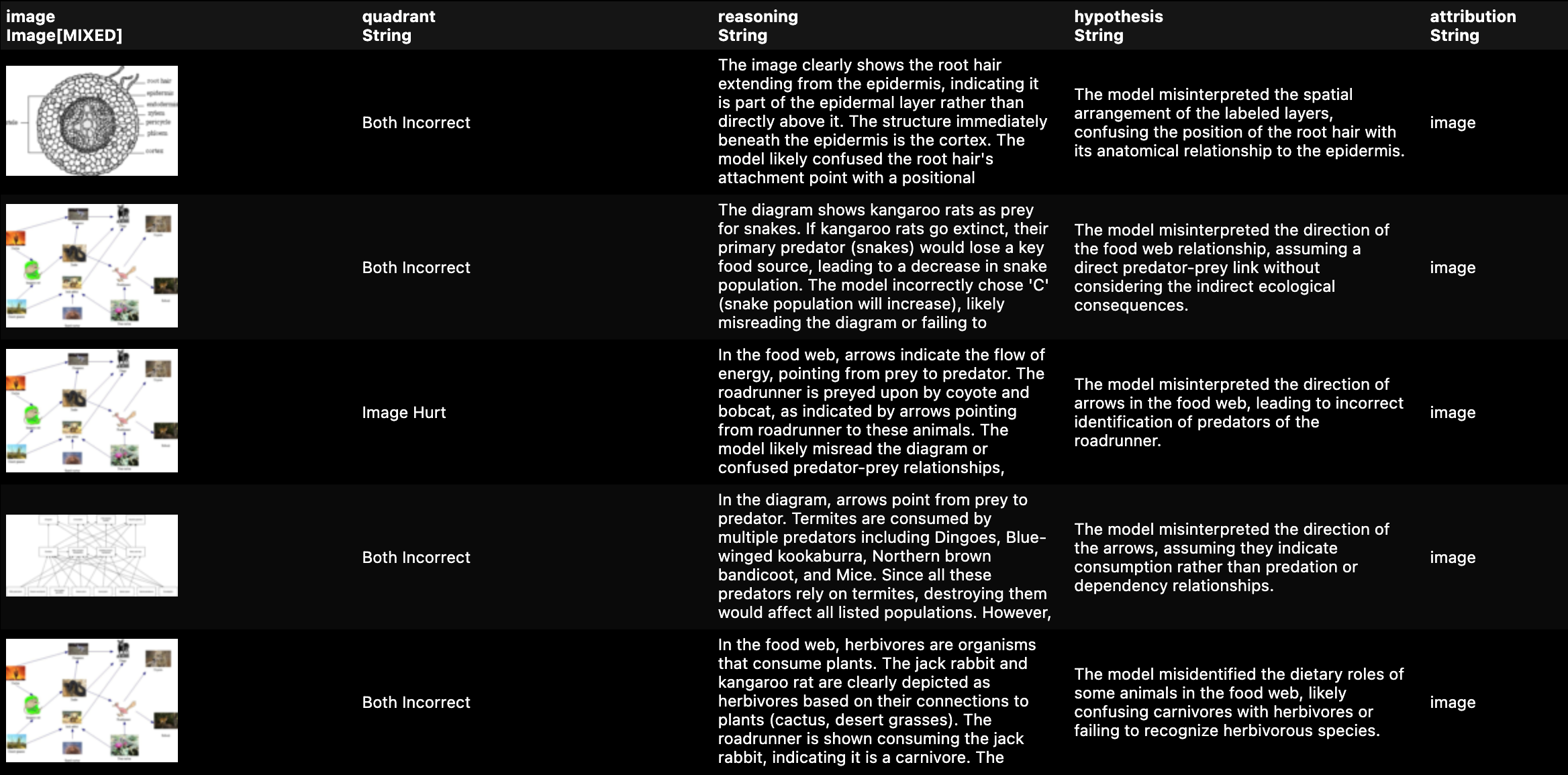
This is the signal needed to improve prompts, fine-tune models, or identify dataset issues. Everything above runs locally in under 3 minutes on 50 rows. But The Cauldron contains millions of rows across 50 subsets.
The challenge? API rate limits and cost.
Running the full AI2D subset through interactive API providers means:
- ~20,000 inference calls (with image)
- ~20,000 inference calls (without image)
- Thousands more for the Judge pass
- 429 Errors throttling you to a crawl
- One massive bill at the end
Ideally we'd run as many inference stages as needed with predictable costs and high throughput. Our multiple choice datasets within The Cauldron sample size covers ~20,000 rows. At this scale, leveraging an interactive provider isn't feasible.
So I ran it on Daft Cloud.
With Daft Cloud I can run Qwen-3-VL-4b on as much data as needed without rate limit headaches or painful GPU configuration.
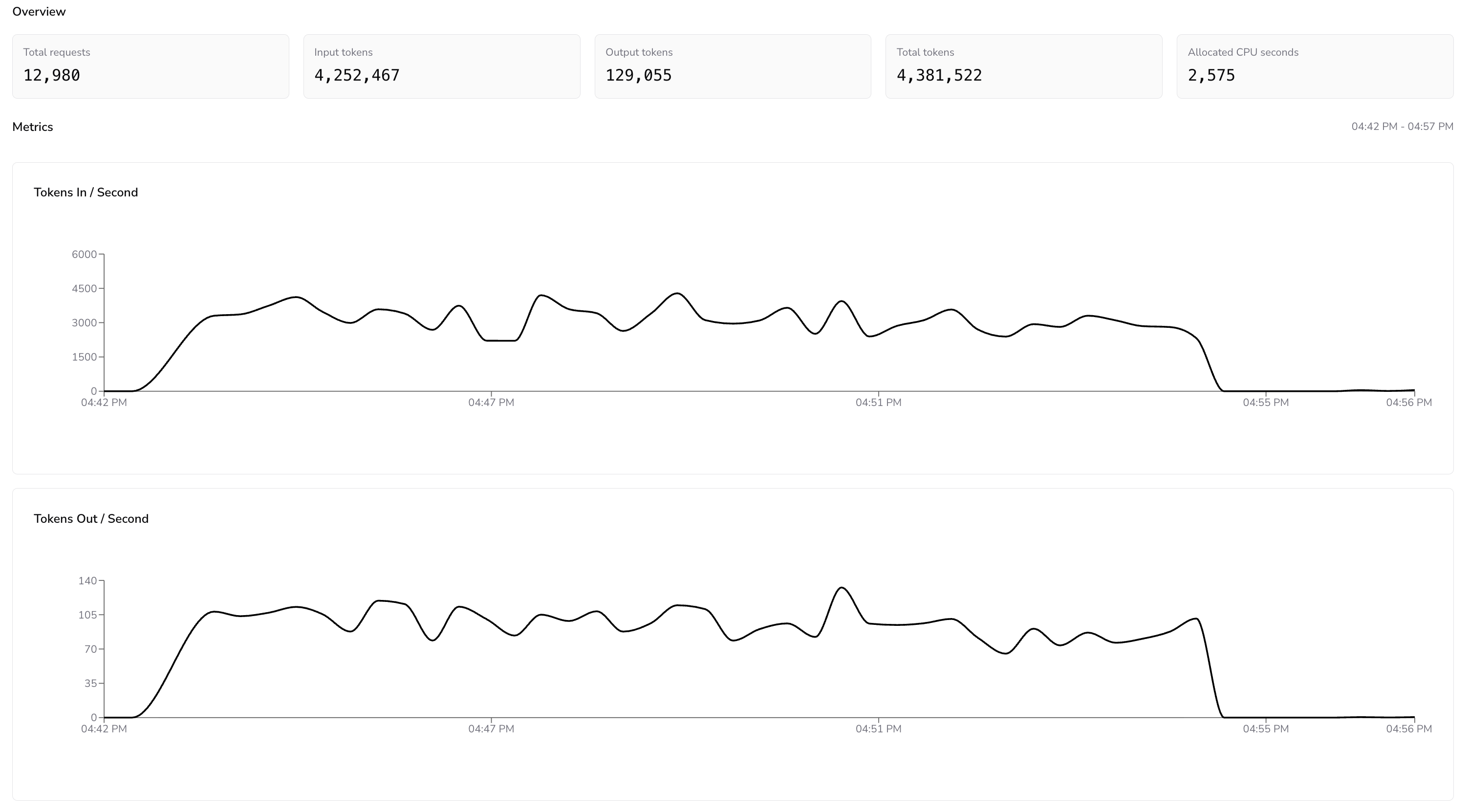
Metrics Dashboard for the TQA Daft Cloud Run

The throughput graphs tell the real story. The Tokens In/Second metric held steady between 3,000 and 4,500 throughout the run, with no degradation as the pipeline worked through the queue. Zero 429 errors. No exponential backoff. No idle time waiting for quota refresh. The pipeline simply processed requests as fast as the model could handle them.
To put this in perspective, running the same evaluation through a typical interactive API provider would take considerably longer. Most free-tier inference endpoints cap you at roughly 10 requests per minute, and even paid tiers impose token-per-minute limits stretching this workload across hours or days. Here, the entire evaluation—20,093 questions with two inference passes each—finished in the background without a hitch.
You can find the full production pipeline on our daft-examples repository. If you're looking to run serverless AI data pipelines, make sure to sign up for Daft Cloud early access and book a demo!
Image Understanding Ablation Evaluation Results
There are few engines faster than Daft at analytics queries. We can easily generate reports from results tables written to S3 by applying transformations calculating aggregate accuracies and classifications.

Most image evaluation benchmarks test model accuracy compared to peers. Our study reveals multiple choice in image evaluations isn't straightforward. Multiple choice provides deterministic verifiable answers, but design and composition have outsized benchmark value impacts.
These textbook/academic diagrams contained excellent semantic reasoning representations; however, many posed questions didn't account for context most LLMs already possess, rendering 70% of all questions useless for evaluating image understanding.
What becomes valuable about this exercise is how clearly it segments quadrant classifications eliminating evaluation noise. By isolating 4,360 questions where "Image Helped" from 13,798 questions where "Both Correct", we can now focus our analysis on the ~22% of questions genuinely testing image understanding.
Key Takeaways
1. Ablation Studies Reveal Dataset Bias, Not Just Model Performance
Our most surprising finding wasn't about Qwen-3-VL-4b, it was about the datasets themselves. Across 20,093 multiple-choice questions designed to test image understanding:
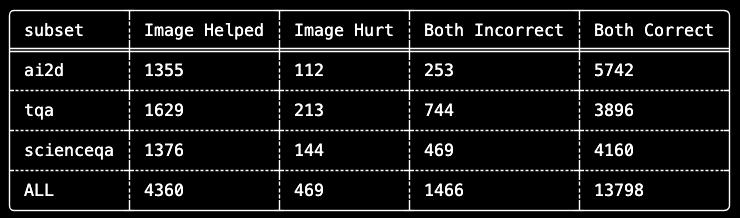
When nearly 70% of an "image understanding" benchmark can be solved blind, we're not measuring vision, we're measuring textual memorization.
2. Multiple-Choice Questions Carry Hidden Context
Multiple-choice question design inadvertently encodes information. Answer options often contain semantic cues that well-trained language models exploit. Consider a food web diagram question asking what would cause kingfisher population increase—even without the diagram, an LLM knows predators increase when prey increases.
This isn't model flaw; it's training consequence on internet-scale text including countless biology textbooks, Wikipedia articles, and educational materials. The model has seen enough food webs knowing the patterns, and it can apply them.
3. The Real Benchmark is the "Image Helped" Subset
For rigorous VLM evaluation, the most informative metric isn't overall accuracy—it's performance on questions where the image was necessary. Our quadrant framework isolates these cases:
Image Necessity Rate by Dataset:
- TQA: 29.5% of correct answers required the image
- ScienceQA: 24.9% of correct answers required the image
- AI2D: 19.1% of correct answers required the image
These rates tell us which datasets provide the strongest signal for evaluating genuine image understanding. TQA, despite having lower overall accuracy, may actually be a more discriminative benchmark.
4. "Image Hurt" Cases Deserve Investigation
The 469 cases where the image decreased accuracy warrant attention. Our LLM-as-a-Judge analysis revealed several patterns:
- Visual ambiguity and fidelity: Diagrams with small or unclear labels or overlapping elements
- Conflicting information: Text context suggesting one answer, image suggesting another
- Attention interference: The model focusing on irrelevant visual details
Understanding these failure modes is essential for improving both models and evaluation datasets.
Conclusion
We set out to evaluate image understanding and ended up evaluating our evaluation. The ablation methodology revealed multiple choice based benchmarks contain substantial textual bias. This has implications for how we interpret published VLM results across the field.
This doesn't diminish AI2D, ScienceQA, or TQA value as resources. These datasets remain useful for training and measuring certain capabilities. But our analysis suggests headline accuracy numbers on these benchmarks may overstate genuine image understanding significantly.
The quadrant framework [Both Correct, Image Helped, Image Hurt, Both Incorrect] provides more nuanced views. It separates questions where the model demonstrates true visual reasoning from questions where it simply applies learned patterns to text. For production systems, this distinction matters.
There are quite a few ways this evaluation could be improved or extended. If you have suggestions or are interested in contributing to the daft-examples repository, we are open source! The code for this evaluation is available in our daft-examples repository.


